
Ok, I threw ChatGPT under the bus in my last post. I gave it something that I thought was a pretty simple task (write an 800 word rant about artificial intelligence replacing writers) and pointed out a lot of the flaws in the output. I made the claim that professional writers should feel pretty safe because the AI can produce text, but not good content. Individual sentences held together well, and the rant itself almost looked convincing.
To paraphrase Harvey Keitel, if we start sticking our big noses in it, the subterfuge won’t last, but at a glance, the output appears to be what we wanted.

I keep thinking about it, though. Today, I was getting ready to write a short D&D adventure set in a tavern run by an ogre with a clever name (I don’t have the name yet, maybe I’ll ask ChatGPT for that?). I set up a prompt with a few variant options in it, mostly trying out different art styles because I haven’t found a Stable Diffusion model that can create an ogre that doesn’t look like Shrek or Joe Rogan.
This one needs some Photoshop work, but I think I’ll run with it. Or maybe I’ll write a bit of backstory to explain the pipe in the ear.

My point is that I’ve got 40-50 images in my output and half a dozen prompts behind them. I’m satisfied enough to accept this, but I’m not terribly happy with it. If I was in charge of approving the art for something going to print, I wouldn’t accept this.
This makes me wonder about the point I made in that last post. Specifically, how much time would it take to get ChatGPT to spit out something that resembled something I get paid to produce? That seems like a fun experiment, so let’s give it a whirl.
The Target
I write a lot of things that I can’t share directly here. I mean, most of the stuff I produce is public—LinkedIn posts, the content those posts link to, emails, product flyers, product webpages, and more—but some of it is updated regularly enough that I don’t want to have a version locked in time over here.
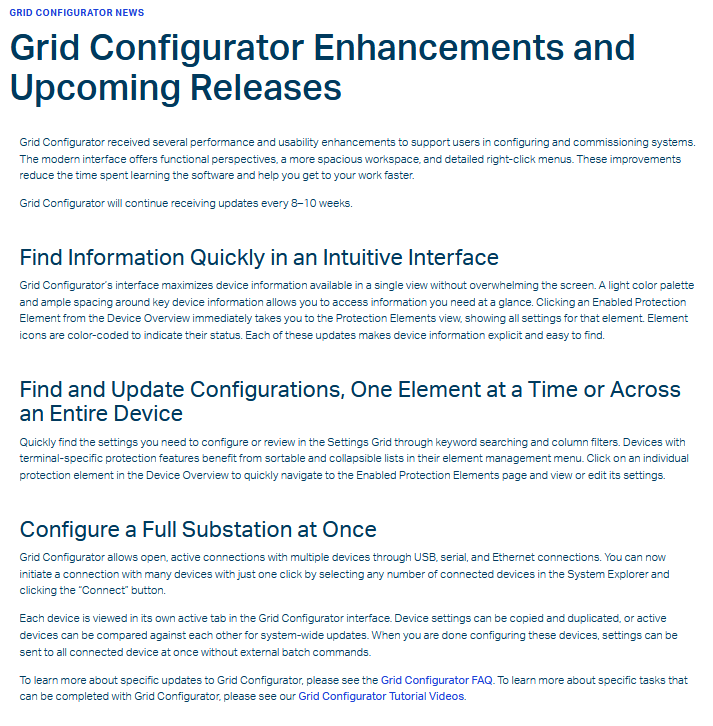
One thing I write that isn’t ever changed is Grid Configurator News. Three or four times a year, that software gets an update, and I write a news post, email, and other documents to announce the release to customers using the tool. The news posts are not overly complex or long, and they are designed to highlight key benefits that anyone involved in setting relays should appreciate.
This makes it a pretty good target text to produce with AI. I don’t want a factual answer to a question (something that the model is explicitly trained to do). I don’t want a clickbait headline or web article. I don’t want a narrative that goes where the gradient descent function leads it.
I want something that answers three specific needs in 300-350 words, just like I was asked to do for the first Grid Configurator News post.
- Explain the meaning and value of a modern software interface
- Highlight the value of being able to find and edit a relay setting quickly
- Explain the value of being able to set all of the devices in a substation at one time
Now, I won’t accept just any coherent response here. I keep pretty good records of how I spend my time (just look through the backlog of this blog) for lots of reasons. I spent two and a half hours of writing time on that first news post, from initial conversations about it, through reviews, to a final, accepted document. So, if I’m going to judge ChatGPT’s output, I need a rubric similar to what my work was judged by.
| Modern software interface | Most of the software in use now was originally designed for Windows 3.x or Windows 95. There are many reasons why the GUIs are not updated, but the design is actually becoming a hurdle for young engineers who have to learn the idiosyncracies of a design scheme that phased out of popular software before they were born. |
| Edit settings quickly | In typical graphical setting software, engineers have to connect to a device, then figure out what settings group their setting is in, find that group, find the setting, then figure out if the setting they found is (a) what they want and (b) correct. There isn’t really a CTRL + F unless you homebrew your own software to read the settings files. |
| Set a full substation | A full substation can have hundreds or thousands of devices. Setting them individually can take weeks, particularly in substations where an engineer has to plug their laptop into each individual relay or connect to individual relays using a command prompt. |
Oh, and if you want a copy of that Grid News post without clicking through the link above, I’ve provided the text at the bottom of this post.
Prompt Engineering
In my last post, I described prompt engineering as the process of iteratively refining your prompt to get the thing you’re looking for. It takes a lot of time and effort, and it takes some expertise in the thing you’re creating to know (a) what to ask for and (b) if you got it.
It’s like the time I tried to order a fancy coffee for my spouse. Not only did I mangle the order and ask for the wrong thing, but I knew so little about what I was ordering that I didn’t recognize the barista gave me something entirely different from what I ordered.
So, to judge ChatGPT’s output here, I need to plan to spend some time refining my prompts until I get something acceptable or until it’s clear that this was a waste of time.
It took me two and a half hours to go from blank page to finished product, with quite a bit of “prompt engineering” from my project teammates helping me refine the messaging in that news post. The basic framework of that first post was done in about half an hour, with phrasing and language adjustments over the next few weeks as the software team weighed in. So, let’s see where I can get in about the same amount of time.
Prompt 1: 20 minutes (Prompting and Evaluating)
write a 300 word news update about software for setting electrical relays. the software is modern and intuitive. the software allows users to find settings easily. the software allows users to set many devices at one time.
Output
Evaluation
Software for setting electrical relays is revolutionizing the industry with its modern and intuitive design. The software, designed to make the process of setting electrical relays as efficient and streamlined as possible, has received high praise from users and industry experts alike.
- Opening is too general and not true at all. Broadly speaking, software for setting relays is not modern and intuitive. That’s the appeal of this new product.
- This is new software. It has not had a chance to receive praise. Where did you get that information?
One of the key features of the software is its ability to allow users to find the right settings easily. With a simple and user-friendly interface, users can quickly and accurately find the settings they need to get the job done right. This eliminates the frustration and time-consuming trial and error process that was previously necessary.
- I didn’t say anything about a trial and error process, but fair assumption. Since this product is an alternative to existing software from this company, we shouldn’t throw it under the bus like that.
- I should have provided some of the details about what makes it simple and user-friendly, because this doesn’t really tell me anything.
In addition to its ease of use, the software also provides users with the ability to set multiple devices at one time. This can be a significant time-saver for electricians and other professionals who need to manage multiple electrical systems. Instead of having to manually set each device one at a time, users can now program multiple devices all at once.
- Pretty accurate, but you can’t manage multiple electrical systems (where did you get that information?).
- Also, no. Engineers do this work. There’s a license involved because you’re mucking around with critical infrastructure.
Another important aspect of the software is its ability to adapt to changing needs and requirements. With regular updates and improvements, users can be confident that the software will continue to meet their needs and provide the best possible experience.
- Did I say the software gets regular updates? I mean, it’s true. I guess this is a news update, so fair assumption.
- What needs, though? And what makes it the best experience, or even a better experience than with other software?
Overall, the software for setting electrical relays is a game-changer in the industry. It provides users with the tools they need to work efficiently and effectively, while also improving the accuracy and reliability of their work. Whether you are an electrician or an engineer, this software is a must-have tool in your arsenal.
- “Game-changer” is pretty bombastic language. We need to done that down.
- This software only sets SEL relays, so I need to provide that in the prompt.
- Electricians don’t get to set relays.
Nope. This wouldn’t fly. For one, it’s making claims that aren’t true about users. For another, the language is too over-the-top for this company (something that my last post said AI would have a hard time really figuring out, unless you trained it on a super narrow model). Finally, the output has a lot of the problems I critiqued about the rant I mentioned up top: it makes claims without really defining its terms or providing evidence.
Rejected. Try again with the feedback above.
Prompt 2: 30 minutes (Refining prompt, evaluating output)
use the previous prompt and output, but remove references to electricians. the software is only used by relay engineers. define "simple and user-friendly interface" using language similar to interface descriptions for modern web browsers or tablet-friendly software. use more conservative language. the software will only be used to set relays made by the company making this software.
Output
Evaluation
Software for setting electrical relays has been specifically designed for relay engineers, offering a modern and intuitive interface that streamlines the process of relay management.
- Eh, it’s OK. This is the kind of introduction I’d write for an internal article to sales reps. “Grid configurator’s newest enhancements have been specifically designed for relay engineers.” But what problem is it solving? Why was it designed?
The software boasts a clean and easy-to-navigate interface, akin to modern web browsers or tablet-friendly software. With its clear and straightforward design, engineers can quickly find and set the necessary relay parameters with ease. This enhances their workflow and productivity, eliminating the need for manual trial and error.
- I gave “modern web browsers or tablet-friendly software” as reference points, not actual descriptors. That language should be in your model. It’s a couple of quick web searches away for me.
- Better definition otherwise, and good work calling out the value of the design.
- I realize that I’m not going to get a much better result for this point no matter how much I re-engineer my prompt. ChatGPT can’t see the software, and I will have to spoonfeed it exactly the description I want it to use.
One of the key benefits of the software is its ability to enable the simultaneous setting of multiple relays. This allows relay engineers to manage multiple electrical systems efficiently, without having to repeat the process for each individual relay.
- I could revise this paragraph to fix it. You can’t manage multiple electrical systems, but you can manage a full substation.
- Kind of lackluster as a selling point, though.
Additionally, the software has been designed to keep pace with changing requirements, with regular updates and improvements ensuring that it remains a valuable tool for relay engineers. Importantly, this software is exclusively for use with relays produced by the same company that developed the software, ensuring a consistent and seamless user experience.
- I like the opening, but let’s be specific. What requirements are changing?
- I might have to provide some specific NERC requirements in the prompt now.
- Or, I might need to describe what today’s engineers expect out of their software.
- I might need to explain what is different about substation design in 2022 that makes this software a necessary upgrade from something designed thirty years ago.
In conclusion, the software for setting electrical relays provides a sophisticated and user-friendly solution for relay engineers, simplifying the process of relay management and improving accuracy and reliability in their work. The clean and intuitive interface, combined with its ability to manage multiple relays simultaneously, makes this software a must-have tool for all relay engineers.
- “In conclusion?” This is a news article, not an essay.
- Otherwise, good wrap-up, but it really relies on the rest of the article to provide the detail of what simplification, cleanliness, and intuitiveness mean.
- Again, not all relay engineers, just the ones working on relays from this company.
Well, we’re approaching an hour into this little experiment. I could ask for a third round of pretty significant revisions, but let’s take a look at what my next prompt is going to have to include:
- Information to support the introductory point of why this software exists, what need it addresses.
- Specific language describing a “modern, intuitive interface.” In other words, I’m back to doing the content writing.
- I’m mentally prepared to revise paragraph 3 on my own. I think this output is about as close as it can get without me telling it exact phrases to use.
- I need to provide a lot of background information that I brought to the project: changing NERC cybersecurity requirements, changes in engineer demographics, the effects of grid modernization on substation design.
If you want it done right…
I mean, look, I could keep going with this exercise. I could maybe find a different target text to produce. Maybe I could use ChatGPT to get me started on the next Grid News article (but in no way will I trust it to just produce the thing on its own). But is it really saving any time or effort? If AI like ChatGPT is supposed to replace copywriters, is it going to produce “the same quality” of work that ChatGPT argued it would make when I asked for that rant?
I asked for a pretty simple thing in a genre with well-defined features. The AI didn’t follow the features well, and it didn’t follow my prompts all that tightly. Where it did follow the prompt closely is exactly where I wanted it to use that famed 750 terabyte training set and its 500 gigabyte model to make some inferences and do the thing you pay a copywriter to do.
When the Grid Configurator software team sat down with me to show me how the program worked and talk about why customers would want it, they did not spoonfeed me precisely the language that they wanted me to write because they aren’t writers. It’s not their job and it’s not their area of expertise. They did tell me similar things to what I included in the prompts above, and I got to see the program in action (something ChatGPT is unable to do).
But, they didn’t tell me about NERC CIP requirements. I knew that from other projects. They didn’t tell me about changing engineer demographics. I knew that because I taught basic interface design. They didn’t say anything about grid modernization, because that’s just a thing I should know about as an SEL employee. (Gratuitous link is for a video I wrote the script for and am pretty darned proud of.)
In other words, I am (in February, 2023) paid $76k per year because I can be shown a piece of software, handed the specs, and asked to write a concise description of it that should get customers interested in it. I can do that quickly—all told, each Grid Configurator update is about 6 hours of work time for five or so pieces of content. I can infer the value of features and ask the software team and other subject-matter experts if my inferences are accurate.
But that’s not a fair comparison! ChatGPT is free!
Is ChatGPT free or just no-cost? I spent an hour getting that AI-generated news article to a place I got to as a writer in half the time. I, a human, had to do that work. If this was my job, I wouldn’t be doing it for free. ChatGPT wrote those text outputs in maybe 30 seconds each time. When I say it took 20 minutes for round one, that was five minutes writing a prompt and fifteen minutes evaluating what I’d need to fix in the prompt to get a better result. The 30 minutes I spent on round two included ten minutes of prompt writing (which would have been longer if I didn’t know I could tell the program to re-use previous input and output) and twenty minutes of figuring out what to do with the output.
Here’s a fun question. Which skillset should cost more to hire: a copywriter with enough mental flexibility to learn the ins and outs of an industry, or someone who can write prompts and evaluate the output with the same expertise in writing as a trained copywriter?
Postscript
Oh, and if you’re wondering if I’ll close that ogre loop from the top of the post:

Post-Postscript

One thought on “ChatGPT Can Be Trained to (Not) Eat Your Children”